Attorney Involvement
Overview
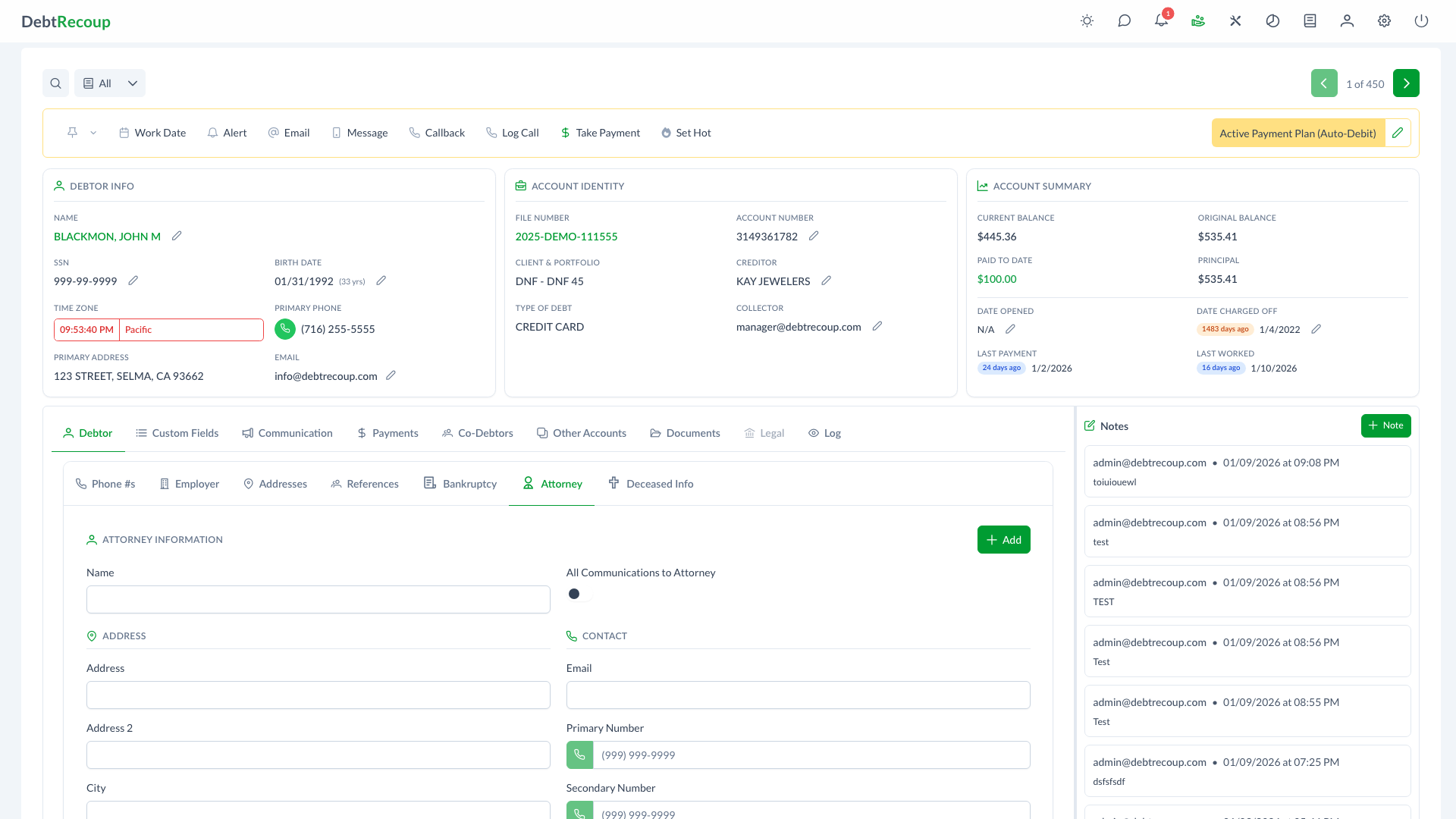
DebtRecoup provides dedicated attorney management functionality for accounts where a debtor has retained legal representation. The Attorney section stores attorney contact details and the All Communications to Attorney preference so collectors can see the representation status while working the account.
Key Benefits
- Compliance Support: Record when communications should be directed to the attorney
- Centralized Information: Store all attorney contact details in one location
- Direct Communication: Initiate calls to attorney phone numbers with click-to-call functionality
- Clear Documentation: Maintain accurate records of legal representation for audit purposes
- Communication Preference: Store the account's attorney-communication preference in one setting
Understanding Your Data
Attorney Information Fields
| Field | Description |
|---|---|
| Name | Full name of the attorney representing the debtor |
| All Communications to Attorney | Toggle that records whether collectors should treat the account as attorney-contact only |
| Address | Primary street address of the attorney's office |
| Address 2 | Suite number, floor, or additional address details |
| City | City where the attorney's office is located |
| State | State where the attorney's office is located |
| Zip | Postal code for the attorney's office |
| Attorney's email address for electronic communications | |
| Primary Number | Main phone number for reaching the attorney |
| Secondary Number | Alternate phone number for the attorney |
Communication Settings
The All Communications to Attorney toggle records the account's attorney-contact preference:
- Enabled: Collectors should treat the account as attorney-contact only
- Disabled: Communications follow standard debtor contact procedures
Using This Feature
Recording Attorney Information
- Navigate to the account's Attorney section
- Click the Add button to create a new attorney record
- Enter the attorney's name in the Name field
- Enable All Communications to Attorney if required
- Complete the address fields with the attorney's office location
- Enter the attorney's email address
- Add primary and secondary phone numbers
- Click Save to store the attorney information
INFO
Name is required. Primary and secondary phone numbers are optional, but each must be 10 digits when entered.
Editing Attorney Details
- Open the account's Attorney section
- Click the Edit button
- Update any fields that have changed
- Click Save to apply changes
Calling the Attorney
To initiate a call to the attorney:
- Locate the phone number you wish to dial (Primary or Secondary)
- Click the phone button next to the number
- The call dialog opens to initiate the call
- Document the call outcome in the account notes
Removing Attorney Information
If a debtor is no longer represented by an attorney:
- Click the Edit button
- Click Remove in the attorney dialog
- Update account notes to document the change in representation
Compliance Considerations
FDCPA Requirements
The Fair Debt Collection Practices Act (FDCPA) has specific requirements for attorney-represented debtors:
Direct Contact Prohibition:
- Once you know a debtor has an attorney, you generally cannot contact the debtor directly
- All communications must go through the attorney
- Violations can result in statutory damages and lawsuits
Documentation Requirements:
- Record how you learned of the attorney representation
- Maintain accurate attorney contact information
- Document all attempts to contact the attorney
- Keep records of attorney responses and communications
Exceptions:
- You may contact the debtor if the attorney fails to respond within a reasonable time
- The attorney may consent to direct debtor contact in writing
- Document any exceptions thoroughly
Best Practices for Compliance
- Immediate Action: Enable the communication toggle as soon as attorney representation is confirmed
- Verify Information: Confirm attorney details through official sources when possible
- Document Everything: Note when and how attorney representation was disclosed
- Train Staff: Ensure all collectors understand attorney contact restrictions
- Regular Audits: Review attorney-represented accounts for compliance
Best Practices
Data Entry
- Enter complete attorney information including all phone numbers
- Use the attorney's official business address, not personal addresses
- Verify email addresses before sending communications
- Keep information current as attorneys may change firms
Communication Management
- Always use the communication toggle when attorney representation is confirmed
- Document all contact attempts with the attorney
- Note any instructions or restrictions from the attorney
- Track response times for escalation purposes
Record Keeping
- Save copies of attorney correspondence
- Document verbal communications with detailed notes
- Record dates of all attorney interactions
- Maintain a clear timeline of representation
Workflow Recommendations
- Create alerts for attorney response deadlines
- Schedule follow-ups when awaiting attorney replies
- Escalate non-responsive attorney matters to supervisors
- Review attorney accounts regularly for status updates
Related Topics
- Notes and Alerts - Documenting attorney communications
- Email Communication - Sending emails to attorneys
- Call Dispositions - Recording attorney call outcomes